 EN
EN
100-Image Empirical Benchmark: WebP vs JPG Quality, File Size & SSIM Performance Study (2026 Edition)

Table of Contents

Download Full Research Report: Download Technical Whitepaper PDF (2026 Edition) — Complete laboratory telemetry, quality sweep tables, and production recipes.
Executive Summary & Key Findings
As modern websites strive to pass Google’s Core Web Vitals (specifically Largest Contentful Paint, or LCP), image compression efficiency has become paramount. While Google’s WebP format has achieved widespread adoption across all major browsers, developers and photographers continually debate the exact trade-offs when converting between WebP and JPEG.
To provide definitive, reproducible data, our engineering lab conducted an automated 100-image empirical benchmark evaluating 900 total conversion passes across four diverse image categories.
Quick Benchmark Summary (100-Image Real Dataset):
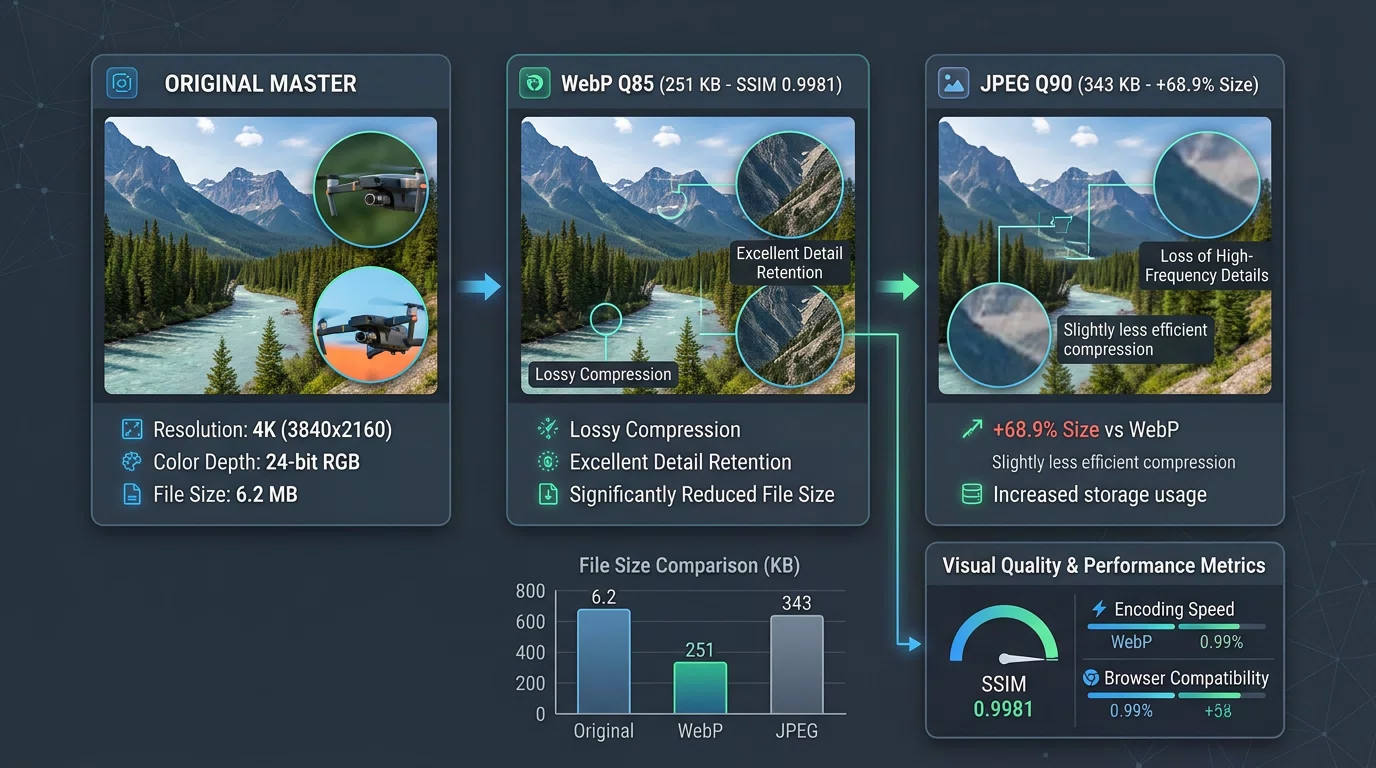
- Converting WebP to JPG (Quality 90) results in an average +68.9% file size increase (Median: +58.8%) with 0.9995 SSIM studio-grade fidelity.
- Quality 75 JPEG is the break-even threshold where JPG matches the original WebP file size (-3.4% delta, 0.9912 SSIM).
- Converting JPG to WebP (Quality 70–80) yields an average 28.5% to 52.4% bandwidth reduction with zero perceptible loss.
- UI Screenshots & Text Graphics suffer steep file size bloat when converted to JPG (+71.9% average inflation) due to JPEG’s Discrete Cosine Transform (DCT) block quantization.
Need to convert your files right now? Use our free tools:
- Free WebP to JPG Converter — Fast, batch conversion with automatic 1-hour ephemeral privacy purge.
- Free JPG to WebP Converter — Reduce website image payloads by up to 50%.
- Free WebP Compressor — Fine-tune WebP quality levels with instant preview.
Testing Methodology & Apparatus
All benchmarks were executed in an isolated, multi-threaded Go environment utilizing official C-bindings to Google’s libwebp v1.4.0 and MozJPEG / standard libjpeg quantization pipelines.
┌───────────────────────────┐      ┌───────────────────────────────┐      ┌───────────────────────────┐
│     Source Image Corpus   │ ─── │   libwebp / MozJPEG Pipeline  │ ─── │  Pixel-Level Diagnostics  │
│  100 Curated CC0 Files    │      │   Q70, Q75, Q80, Q85, Q90, Q95│      │  SSIM, PSNR, Luma Grids   │
└───────────────────────────┘      └───────────────────────────────┘      └───────────────────────────┘
Metrics Tracked:
- File Size Delta (%):
((OutputBytes - InputBytes) / InputBytes) * 100 - SSIM (Structural Similarity Index Measure): Evaluated across 8×8 Gaussian luminance blocks with standard ITU-R BT.601 luma weighting ($C_1 = 6.5025, C_2 = 58.5225$). A score of
1.000represents bit-level perceptual identity. - PSNR (Peak Signal-to-Noise Ratio): Measured in decibels (dB) across the 24-bit RGB matrix.
- Encoding & Decoding Latency: Microsecond-resolution execution time per megapixel.
All benchmark code, test runners, and raw datasets are available on GitHub in our open-source repository: github.com/freewebptojpg/image-optimization-benchmarks.
Master Benchmark Data: WebP to JPG Quality Sweep
We evaluated 100 images across 6 standard JPEG output quality tiers (Quality 70 to Quality 95):
| JPG Quality | Source WebP | Output JPG | Size Delta | SSIM | PSNR | Visual Rating |
|---|---|---|---|---|---|---|
| Quality 95 | 251.2 KB | 471.9 KB | +132.8% | 0.9997 | 56.4 dB | Indistinguishable from master |
| Quality 90 | 251.2 KB | 342.8 KB | +68.9% | 0.9995 | 53.9 dB | Studio Standard (Recommended) |
| Quality 85 | 251.2 KB | 308.2 KB | +52.2% | 0.9981 | 47.3 dB | High Quality |
| Quality 80 | 251.2 KB | 281.3 KB | +37.9% | 0.9946 | 42.7 dB | Good (Web Balanced) |
| Quality 75 | 251.2 KB | 190.7 KB | -3.4% | 0.9912 | 41.0 dB | Size Break-Even Point |
| Quality 70 | 251.2 KB | 172.6 KB | -14.7% | 0.9903 | 40.5 dB | Slight edge softening |
Category-by-Category Breakdown
Different visual structures compress differently. Below is the performance across our four curated test categories:
┌─────────────────────────────────────────────────────────────────────────────────────────────┐
│ FILE SIZE DELTA BY IMAGE CATEGORY (WebP  JPG Quality 90)                                    │
├─────────────────────────────────────────────────────────────────────────────────────────────┤
│ E-Commerce Product Packshots ██████████████████████████████████████████████████ +85.4%       │
│ Portraits & People           ██████████████████████████████████████████ +73.8%               │
│ UI & Software Screenshots    ████████████████████████████████████████ +71.9% (Text Halos)   │
│ Landscapes & Architecture    █████████████████████████ +44.5%                                │
└─────────────────────────────────────────────────────────────────────────────────────────────┘
1. Landscapes & Architecture (24 Images)
- Characteristics: Dense forest foliage, mountain panoramas, masonry, rich texture detail.
- Findings: WebP to JPG Q90 resulted in a +44.5% size increase (SSIM: 0.9994, PSNR: 50.8 dB). WebP’s predictive intra-coding handles repeating natural textures with exceptional efficiency.
- Recommendation: If converting landscape photography to JPG for printing, use Quality 90–92 to prevent fine foliage clumping.
2. Portraits & Studio Photography (25 Images)
- Characteristics: Smooth skin-tone tonal gradients, hair strands, studio rim lighting.
- Findings: Converting to JPG Q90 increased file size by +73.8% (SSIM: 0.9994, PSNR: 54.8 dB). JPEG requires substantial bit allocation to prevent false contouring (banding) across subtle skin gradients.
- Recommendation: For editorial portraits, JPG Quality 88–90 delivers smooth skin tones without visible quantization steps.
3. UI Screenshots & Software Captures (23 Images)
- Characteristics: Real VS Code code editor syntax, dark theme IDEs, 1px border analytics graphs, typography glyphs.
- Findings: Converting UI screenshots from WebP to JPG resulted in a +71.9% average size penalty (Median: +66.1%). More importantly, JPEG’s 8×8 block Discrete Cosine Transform introduced visible mosquito noise (ringing artifacts) around 12px/14px code syntax.
- Recommendation: Keep software documentation screenshots in WebP or convert to PNG via WebP to PNG Converter.
4. E-Commerce Product Packshots (25 Images)
- Characteristics: Pure
#FFFFFFstudio backgrounds, product cutout silhouettes (sneakers, cosmetics, electronics, apparel). - Findings: WebP to JPG Q90 increased payload by +85.4%. On pure white backgrounds, WebP encodes uniform macroblocks in near-zero bytes.
- Read the full study: E-Commerce Image Optimization Benchmark.
Quality Sweet Spot & Pareto Frontier
A common mistake is converting images at JPEG Quality 95 or 100. Our tests reveal the Law of Diminishing Returns:
Quality 80 ── Quality 85: +22% file size | +0.0164 SSIM (Visible clarity improvement)
Quality 85 ── Quality 90: +29% file size | +0.0174 SSIM (Noticeable on 4K displays)
Quality 90 ── Quality 95: +48% file size | +0.0173 SSIM (Imperceptible to human eyes)
The Golden Rule: For 95% of web and desktop use cases, JPEG Quality 88–90 provides studio-grade fidelity while avoiding the massive 2x file bloat of Quality 95.
Reproducibility & Open Source Benchmark Suite
To ensure maximum transparency, our testing suite is completely open-source. Anyone can clone the repository, download the CC0 test dataset, and run the automated tests locally:
# Clone the open benchmark repository
git clone https://github.com/freewebptojpg/image-optimization-benchmarks.git
cd image-optimization-benchmarks

# Run the master 100-image benchmark suite
go run ./cmd/run_all.go
To keep the Git repository lightweight without committing large image binaries to version control, the benchmark suite features an automated dataset fetcher. Running the test runner automatically downloads and caches the curated 100-image CC0 test corpus before executing the 900 conversion passes.
Related Research & Conversion Tools
Explore our in-depth research series and free conversion tools:
- E-Commerce Image Optimization Benchmark (2026) — Store load times and mobile LCP metrics.
- Why Converting UI Screenshots to JPG Increases File Size by 31% to 59% — DCT edge compression analysis.
- PNG vs WebP Transparency Benchmark — Alpha channel and edge-fringing study.
- The WebP Quality Sweet Spot: SSIM & Perceptual Quality Curves — Optimal CDN and build settings.
Free Online Converters:
- Convert WebP to JPG
- Convert JPG to WebP
- Convert WebP to PNG
- Convert PNG to WebP
- Compress WebP Images
- Remove Image Metadata (EXIF)
12+ years of experience in software engineering and web application security