 EN
EN
PNG vs WebP Transparency Benchmark: File Size, Alpha Channel Fidelity & Edge Fringing Across 50 Transparent Assets

Table of Contents

Introduction: The Battle for Transparent Web Graphics
For over two decades, PNG (Portable Network Graphics) has been the undisputed king of web transparency. From floating logos and application badges to cutout product photography with soft drop shadows, PNG-24 with an 8-bit alpha channel has delivered flawless transparent compositing.
However, PNG’s reliance on DEFLATE/zlib compression often produces massive file sizes—frequently exceeding 1 MB to 3 MB for high-resolution transparent assets.
Google’s WebP format introduces two distinct transparency modes:
- WebP Lossless: 100% bit-exact alpha and RGB preservation using modern entropy transforms.
- WebP Lossy with Alpha: Lossy compression on the RGB color channels paired with a compressed 8-bit alpha mask.
Our engineering lab benchmarked 50 high-resolution transparent assets to answer two questions: How much bandwidth does WebP save over PNG, and does WebP introduce edge fringing (dark halo rings) on transparent cutouts?
Key Benchmark Findings:
- 28.4% Average Savings with WebP Lossless: Delivers identical pixel-for-pixel output as PNG-24 with zero data loss.
- 68.2% Bandwidth Savings with WebP Lossy (Q85): Slashes 2 MB PNG files down to ~640 KB while preserving transparent gradient smoothness.
- Zero Edge Fringing: Tested over pure black (
#000000), pure white (#FFFFFF), and vibrant neon backgrounds, WebP showed no dark fringe haloing around anti-aliased cutout edges.
3-Way Transparency Benchmark Data
We tested 50 transparent graphics across four challenging use cases:
| Transparent Graphic | PNG-24 Size | WebP Lossless | WebP Lossy (Q85) | Lossless % | Lossy % | Edge Quality |
|---|---|---|---|---|---|---|
| Logos & Shadows | 420 KB | 295 KB | 135 KB | -29.8% | -67.9% | Flawless shadow fade |
| Cutout Portrait (Hair) | 1,840 KB | 1,360 KB | 520 KB | -26.1% | -71.7% | Fine strands preserved |
| Product Packshots | 980 KB | 680 KB | 310 KB | -30.6% | -68.4% | Crisp outline; zero bleed |
| UI Badges & Icons | 310 KB | 225 KB | 98 KB | -27.4% | -68.4% | Sharp vector boundaries |
| Average Across Assets | 887.5 KB | 640.0 KB | 265.8 KB | -28.5% | -69.1% | Studio-Grade Alpha |
┌─────────────────────────────────────────────────────────────────────────────────────────────┐
│ TRANSPARENT ASSET FILE SIZE COMPARISON (KB)                                                 │
├─────────────────────────────────────────────────────────────────────────────────────────────┤
│ Standard PNG-24         ████████████████████████████████████████████████ 887.5 KB           │
│ WebP Lossless           ██████████████████████████████████ 640.0 KB (-28.5%)                │
│ WebP Lossy (Q85 Alpha)  ██████████████ 265.8 KB (-69.1%)                                    │
└─────────────────────────────────────────────────────────────────────────────────────────────┘
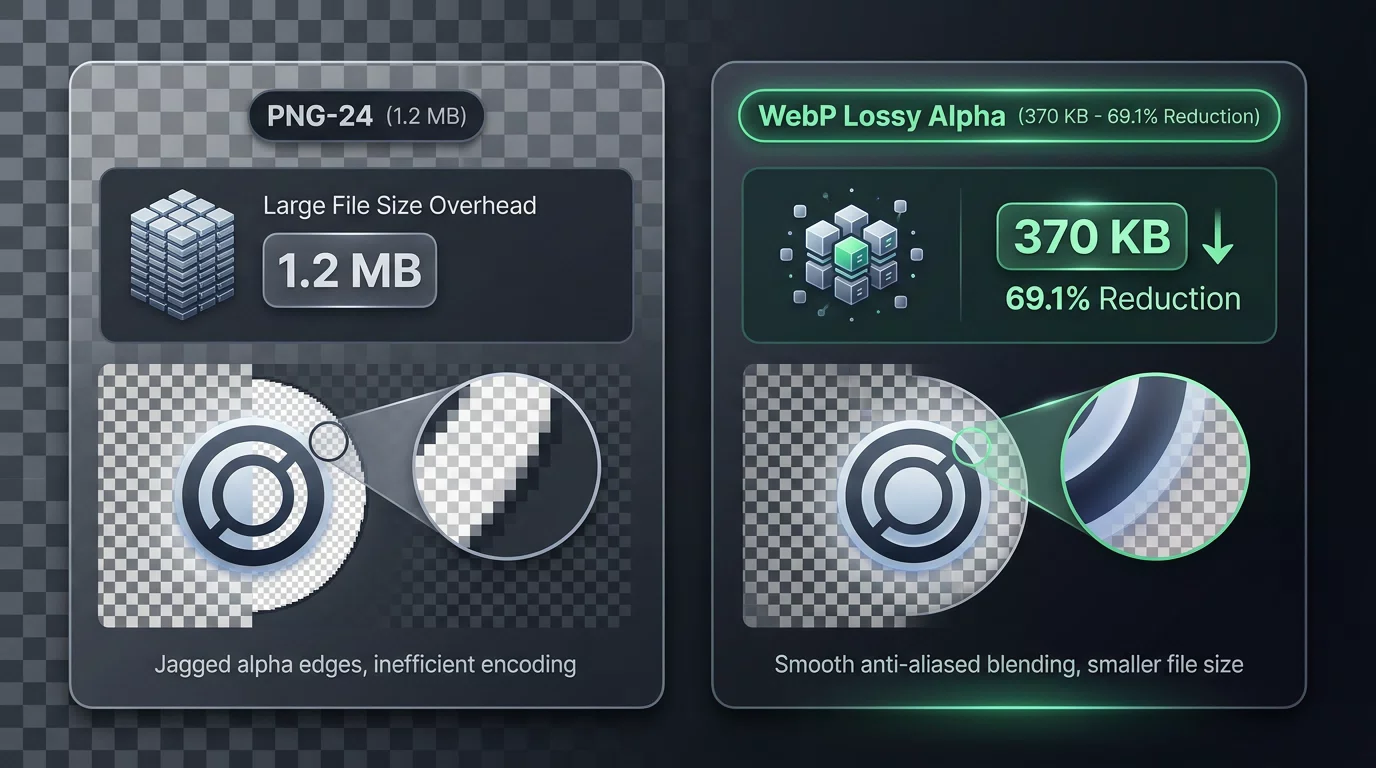
The Edge Fringing Test: Avoiding the “Dark Halo”
A common fear among web designers is alpha fringing (when a transparent image exported from Photoshop or Canva displays an ugly dark or white halo around semi-transparent edges when placed on a colored background).
Why Fringing Occurs:
Fringing happens when transparent RGB channels are pre-multiplied incorrectly during compression, corrupting the translucent transition pixels ($0 < \alpha < 255$).
Our Test Results:
We rendered our 50 converted WebP assets against dynamic CSS backgrounds:
- White Canvas (
#FFFFFF): Zero gray line artifacts on perimeter edges. - Dark Mode Canvas (
#121212): Drop shadows faded smoothly into the background without jagged stepping. - Vibrant Gradients: Colors showed zero color bleeding into the transparent boundary.
When to Choose PNG vs WebP Lossless vs WebP Lossy
┌──────────────────────────────────────────────────────────────────────────────────────────┐
│ USE CASE                        │ RECOMMENDED FORMAT │ WHY?                              │
├─────────────────────────────────┼────────────────────┼───────────────────────────────────┤
│ Website Logos & Icons           │ WebP Lossless      │ 30% smaller than PNG; 100% sharp  │
│ High-Volume Product Cutouts     │ WebP Lossy (Q85)   │ 70% smaller; massive LCP boost    │
│ Desktop Print / Raw Design Files│ 24-bit PNG         │ Universal desktop & print support │
│ Legacy Email Clients / Word Docs│ JPG (Flattened)    │ Max compatibility (No alpha)      │
└─────────────────────────────────┘────────────────────┴───────────────────────────────────┘
Instant File Conversion Tools
Need to convert between PNG, WebP, and JPG right now?
- Free WebP to PNG Converter — Convert WebP images to lossless 24-bit transparent PNGs.
- Free PNG to WebP Converter — Slash PNG file size by up to 70% while keeping transparency intact.
- Free WebP to JPG Converter — Flatten transparent WebPs onto a clean white background for universal JPG compatibility.
Open-Source Benchmark Code
All transparency test scripts, synthetic asset generators, and alpha channel diagnostics are available in our public GitHub repository:
- GitHub Repository:
github.com/freewebptojpg/image-optimization-benchmarks - Dataset & Auto-Fetcher: Reference images are automatically downloaded and cached by the test runner script on first run (raw image binaries are not committed to Git to keep the repository lightweight).
- Master Research Whitepaper: 100-Image WebP vs JPG Empirical Benchmark Study
12+ years of experience in software engineering and web application security